
 2019.01.20 업데이트 정보(v.1.9.8)(v.1.9.9)
2019.01.22 업데이트 정보(v.1.9.9)-----------------------------------------------------------------------------------------------------------1.9.8 업데이트 후 발생한 오류를 수정하여 배포하였습니다.Version 1.9.9 has been updated. Fixed an error after 1.9.8 update and distributed it. ============================================================== 2019.01.20 업데이트 정보(v.1.9.8)------------------------------------------------------..
 2019.01.05 업데이트 정보(v.1.9.6)
★업데이트 내용(Update contents) 1. "건강충전 자동시작" 설정 기능이 추가되었습니다."Health Charge Auto Start" function has been added. 건강충전 자동시작을 설정 후 전원케이블을 연결하면 아래와 같은 화면이 나타납니다.After setting Healthy Auto Start, connect the power cable and the following screen will appear. 7초 카운트 다운을 진행합니다. 카운트 다운 종료시 건강충전이 시작됩니다.Proceed in 7 seconds countdown. At the end of the countdown, the health charge begins. 2. 충전케이블 연결시 노출되는 알림창..
 2018.11.21 업데이트 정보(v.1.9.5)
★업데이트 내용(Update contents) 1. "전원 연결 확인 창 끄기" 설정 기능를 추가하였습니다. - 충전케이블이 연결되었는지 확인용으로 개발되었으나, 일부 사용자들이 불편하다는 문의가 있네요. Added "Turn off power connection confirmation" setting function.- It was developed for the purpose of confirming that the charging cable is connected, but some users are inconvenienced. 2. 잘 못 된 번역 일부가 수정되었습니다. Some incorrect translations have been fixed. 3. "저장소 권한" 요청시, 사용자가 "다시 묻..
 2018.10.09 업데이트 정보(v.1.9.4)
★업데이트 내용(Update contents) 1. 배타리 잔량 상단 노출시 배터리 온도 표기 추가되었습니다.- Battery level indicator - Battery temperature indication added 2. 설정 - 볼륨 조절 버튼을 추가하였습니다.- Setup - Add volume control button 3. 안드로이드 오레오 지원 ( SDK 26, SDK27)- Android Oreo support 4.일부 오류가 수정되었습니다.- Fixed some errors 문의사항이 있으시면 댓글 달아주시거나 아래 메일로 연락주세요. If you have any questions, please feel free to reply or contact me by email below. ..
 2018.06.28 업데이트 정보(v.1.9.2)
★업데이트 내용(Update contents) 1. 일부 스마트폰에서 발생하는 오류가 수정되었습니다.Fixed an error on some smartphones. 2. 최신버전 업데이트 화면에서 앱 아이콘을 클릭하시면 앱의 상세 정보 페이지로 이동할 수 있습니다.앱이 정상적으로 동작하지않을경우 자동시작을 켜주세요. You can go to the detail page of the app by clicking the app icon on the latest version update screen.If the app does not work properlyPlease turn on auto start. 자동시작이 비활성화되어있으면 앱이 정상적으로 동작하지않으니 반드시 변경해주세요. 첨부된 스크린 샷은 샤오..
★업데이트 내용(Update contents) 일부 스마트폰에서 발생하는 오류가 수정되었습니다.Fixed an error on some smartphones. 문의사항이 있으시면 댓글 달아주시거나 아래 메일로 연락주세요. If you have any questions, please feel free to reply or contact me by email below. e-mail : ddolcatmaster@gmail.com 구글마켓 다운로드 : https://play.google.com/store/apps/details?id=ddolcatmaster.mypowermanagement
★업데이트 내용(Update contents) 1.구글Firebase 라이브러리 버전 업데이트 15.0.0 2.google.gms:google-services 버전 업데이트 3.2.0 3.독일어 번역 수정 ( 도움을 주신 Peter Poguntke 님께 감사드립니다) 4.러시아어 번역 수정( 도움을 주신 aleks maximenko 님께 감사드립니다) Help fix the wrong translation.Thank you. 문의사항이 있으시면 댓글 달아주시거나 아래 메일로 연락주세요. If you have any questions, please feel free to reply or contact me by email below. e-mail : ddolcatmaster@gmail.com 구글마켓 다운..
★업데이트 내용(Update contents) 1. 몇가지 오류가 수정되었습니다.Several errors have been fixed. 2. 구글플레이 사이트 개편으로 앱의 버전체크가 되지않는 오류를 수정하였습니다. Fixed an error that the version check of the app did not work due to the reorganization of Google Play site. 문의사항이 있으시면 댓글 달아주시거나 아래 메일로 연락주세요. If you have any questions, please feel free to reply or contact me by email below. e-mail : ddolcatmaster@gmail.com 구글마켓 다운로드 : http..
 2018.04.01 업데이트 정보(v.1.4.74)
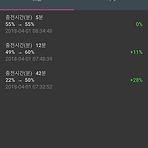
★업데이트 내용(Update contents) 1. 충전기록 보는 화면이 리뉴얼 되었습니다. 충전시작시 배터리%와 충전케이블 분리시 배터리% 표기를 추가하였습니다. Charge History viewing screen has been renewed. Added battery% when charging started and battery% when charging cable is disconnected. 2.폴란드어 번역이 갱신되었습니다. 번역에 도움을 주신 Marek Bogacz님께 감사드립니다. Polish translation updated. Thanks to Marek Bogacz for his helpful translations. 문의사항이 있으시면 댓글 달아주시거나 아래 메일로 연락주세요. I..
★업데이트 내용(Update contents) 1.안드로이드 7.0 이상(누가 버전 이상)에서 언어설정이 안되는 오류가 수정되었습니다. (LG G6, 갤럭시 노트8, 갤럭시S8 확인 완료) 2.언어설정 메뉴가 설정메뉴에서 상단으로 위치가 변경되었습니다. 3.알림노래로 설정된 파일이 삭제되었을 경우 기본알림노래로 노출되도록 수정하였습니다. 4. 그외 알수없는 오류가 일부 수정되었습니다. 1. Fixed an error where the language setting can not be set in Android 7.0 or later (who version).(LG G6, Galaxy Note 8, Galaxy S8 confirmed) 2. The language setting menu has been m..